
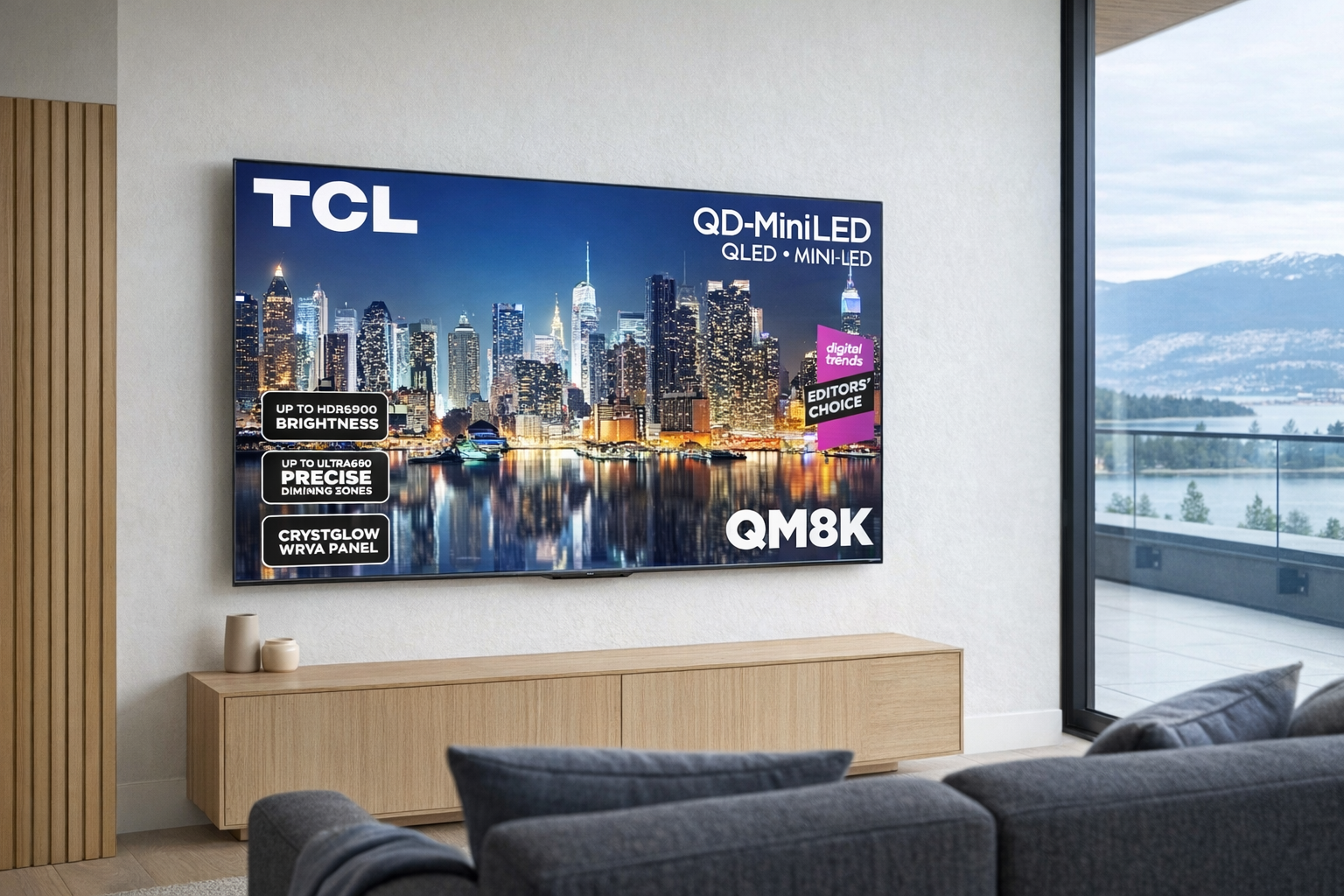
The TCL QM8K 65" 4K TV sits in a part of the TV market that has become unusually crowded: the "premium but not absurdly priced" big-screen category. This is where brands promise flagship-style brightness, strong contrast, gaming features, and smarter picture processing without pushing you int...
The TCL QM8K 65" 4K TV sits in a part of the TV market that has become unusually crowded: the "premium but not absurdly priced" big-screen category. This is where brands promise flagship-style brightness, strong contrast, gaming features, and smarter picture processing without pushing you into OLED money. For a lot of people, that is the sweet spot. You want a TV that looks impressive with movies, sports, and console gaming, but you do not necessarily want to redesign your budget around it.
This article is not a hands-on review. Nothing here is based on personally using the TV. Instead, the goal is to explain what the TCL QM8K 65" 4K TV appears to be, where it likely fits in the current TV landscape, and what kinds of buyers should take it seriously — all based on the listing details, the model's place in TCL's lineup, and what this class of television usually delivers. If you are trying to decode whether this is a real upgrade or just another bright screen with a lot of marketing language around it, this is for you.
Quick snapshot
| Question | What the TCL QM8K 65" 4K TV actually is |
|---|---|
| Category | Entertainment |
| Made by | TCL |
| Typical price | Pricing varies — check current Canadian listings |
| Rating signal | 4.4/5 on the source listing |
| Best for | Buyers wanting a large 65-inch 4K TV with premium-tier ambitions for movies, sports, and gaming |
| Skip if | You want the thinnest possible design, guaranteed top-tier built-in audio, or a smaller room-friendly screen |
Pro tip: If you are considering the TCL QM8K 65" 4K TV, budget for the whole setup, not just the panel. A 65-inch premium TV usually makes the most sense when paired with a decent soundbar and a room where you can actually sit far enough back to enjoy it.
What the TCL QM8K 65" 4K TV actually is
In plain English, the TCL QM8K 65" 4K TV is a large-screen smart television aimed at people who want more than entry-level 4K. The "QM" branding in TCL's lineup generally points to its more premium QD-Mini LED offerings rather than its basic bargain models, which tells you the pitch right away: higher brightness, better contrast control than standard LED TVs, and a more serious attempt at home-cinema and gaming performance. The 65-inch size is also worth stressing. This is not a casual bedroom TV. It is a living-room anchor.
The product listing URL itself points to a 65-inch QD-Mini LED model, which is the useful part to focus on. In practical terms, that means this is likely a TV using a traditional LCD panel enhanced by quantum-dot colour and a Mini LED backlight system with more precise dimming than older full-array sets. That combination exists for one reason: to get closer to OLED-style contrast and premium HDR punch while still delivering the high brightness LCDs are known for. When companies get this right, it is a very good middle-ground technology.
The clearest real-world comparison is TCL's own QM851G from the earlier QM8 generation. The newer QM8K appears positioned as a successor-style model in the same premium Mini LED family rather than a totally different kind of TV. That matters because buyers often assume every new TV is a huge leap. Usually it is not. It is more often a refinement: improved processing, brighter highlights, better local dimming control, cleaner motion, maybe updated gaming support. Evaluate it like a better version of a strong existing formula, not like a magic invention.
Key features at a glance
- 65-inch screen size suited to main living rooms and dedicated TV spaces
- 4K resolution for modern streaming, console gaming, and UHD content
- QD-Mini LED positioning according to the listing URL, suggesting premium LCD-style brightness and contrast
- Smart TV platform features expected in this class for streaming apps and voice-assistant integration
- Premium-tier intent within TCL's lineup rather than entry-level value-only positioning
- Likely strong fit for HDR movies, sports, and gaming based on category and lineup placement
How the TCL QM8K 65" 4K TV actually works
A TV like the TCL QM8K 65" 4K TV works by combining a 4K LCD panel with a much more advanced backlight than what you get on cheaper sets. The important distinction is not just that it is "bright." Plenty of mediocre TVs are bright. The point of a Mini LED system is finer control over where light goes and where it does not. In a good implementation, bright areas of an image — say sunlight, stadium lights, or a torch in a dark scene — can pop harder without washing out the whole screen.
The "QD" part usually refers to quantum dots, which are there to improve colour volume and help the TV maintain richer colours at higher brightness levels. That matters more than spec-sheet language makes it seem. Many TVs look acceptable in a dim showroom demo but start losing finesse with demanding HDR content. A stronger Mini LED plus quantum-dot setup is meant to keep bright scenes from turning harsh and colourful scenes from looking dull.
Then there is the processing layer. Modern premium TVs are not just panels with lights behind them. They are constantly analyzing incoming video, deciding how to scale lower-resolution content to 4K, smoothing or preserving motion, balancing shadow detail, and interpreting HDR formats. That is why two TVs with similar panel tech can still look quite different. The QM8K's value, if it delivers on the promise of the line, is not simply "more LEDs." It is whether TCL has tuned the dimming, motion handling, and upscaling well enough that normal people notice cleaner picture quality from across the couch.
From a daily-use standpoint, there are usually three layers to think about:
- Panel and backlight performance. This determines black levels, brightness, blooming control, and HDR punch.
- Processing and smart software. This affects streaming-app usability, motion handling, voice control, and how good cable, sports, and older content look.
- Ports and gaming support. For buyers with a PlayStation 5, Xbox Series X, or gaming PC, this is where refresh-rate support, low latency, and HDMI capabilities matter most.
The key point is simple: a 65-inch premium TV only feels premium when all three layers are competent. A bright panel alone is not enough.
A realistic "day in the life" with TCL QM8K 65" 4K TV
Because this is an informational explainer, here is what a typical day might look like based on the model's category and positioning — not a tested account.
- Morning. Someone turns on a news channel or YouTube stream while getting ready for the day. This is where a premium 4K TV has to do unglamorous work well: handling compressed broadcast content, keeping faces natural, and making upscaled non-4K material look respectable on a 65-inch screen rather than exposing every flaw.
- Midday. A bright room with sunlight coming in is where a higher-end Mini LED TV tends to justify itself. If the QM8K follows the usual strengths of TCL's upper-tier LCD sets, this is where it should outperform cheaper dimmer TVs. Reflections and room brightness matter less when the panel has enough output to push through them.
- Afternoon. Sports or live events go on, and motion becomes the real test. Fast camera pans, grass textures, jerseys, and score overlays can look messy on weaker TVs. A better premium set should keep action clearer and brighter, especially in a large living room where multiple people are watching from different spots.
- Evening. This is the home-cinema use case: lights dimmed, streaming a 4K HDR movie, maybe with a soundbar attached. This is where local dimming, shadow detail, and highlight control matter most. If the TV performs the way TCL's premium Mini LED family is meant to, evening movie viewing is the reason to buy it instead of a basic 65-inch set.
Who the TCL QM8K 65" 4K TV is actually for (and who it isn't)
Great fits
- People replacing an older 55-inch or 60-inch TV and wanting a noticeable jump in immersion without moving into projector territory.
- Families who watch a mix of streaming, sports, and console gaming in one main room and need one screen that can handle all three reasonably well.
- Buyers cross-shopping premium LCDs from TCL, Hisense, and Samsung who care more about picture impact than brand prestige.
- Condo or house dwellers with a proper living-room wall and seating distance to make a 65-inch screen feel intentional rather than overwhelming.
- Gamers who want a modern big-screen setup for PS5 or Xbox Series X and are specifically looking beyond basic low-cost 4K TVs.
Poor fits
- People furnishing a small bedroom, office, or den where 65 inches will dominate the room and become tiring rather than cinematic.
- Buyers who want the absolute best black levels for dark-room movie nights and are already considering OLED alternatives.
- Anyone expecting built-in TV speakers to replace a decent soundbar or home-theatre audio setup. That is rarely realistic at this size or price class.
- Shoppers who mostly watch low-quality cable feeds and are not interested in HDR, gaming, or premium streaming content; a cheaper TV may be good enough.
- Minimalists who care deeply about ultra-thin industrial design. Premium Mini LED TVs are often thicker than OLEDs because the backlight system is doing real work.
Practical trade-offs
Picture quality versus OLED expectations
This is the first honest trade-off. A premium Mini LED TV is often pitched as the best of both worlds: OLED-like contrast with much higher brightness. Sometimes that is directionally true. It is not literally true. Even very good local dimming can still produce some blooming or haloing around bright objects in dark scenes, because the backlight is controlling zones rather than individual pixels.
That does not make the TCL QM8K 65" 4K TV a bad bet. It just means you should buy it for what Mini LED is actually good at: bright-room viewing, strong HDR impact, and large-screen value. If your entire buying decision is driven by midnight movie watching in a dark room, OLED remains the cleaner answer if your budget allows.
Sound
A 65-inch premium TV can look expensive and still sound merely fine. That is normal. Thin TV chassis do not leave much room for speaker volume, bass, or spaciousness. Dialogue may be clear enough for casual viewing, but blockbuster movies, sports crowd noise, and game effects usually benefit from external audio.
That is why the best way to budget for a TV like this is to think in layers. The screen does the visual heavy lifting. A soundbar handles the rest. Evaluate it like buying a display first and an entertainment system second, not like buying an all-in-one cinema box.
Smart software and long-term support
The hardware is only half the ownership experience now. Smart TVs live or die by app support, software stability, and update quality over time. Even a strong panel can become annoying if the interface is sluggish, ads get more aggressive, or apps lag behind newer streaming standards.
That does not mean you should avoid smart TVs; you cannot really avoid them anymore. It just means there is a practical hedge: if you care deeply about consistent usability, a dedicated streaming box like an Apple TV 4K or a Google TV Streamer can future-proof the setup. That is often a more honest long-term plan than assuming the built-in software will feel equally polished in three or four years.
Where the TCL QM8K 65" 4K TV fits in a smart home
The TCL QM8K 65" 4K TV makes the most sense as the visual centre of a living-room setup rather than as a smart-home hub in its own right. Yes, modern TVs usually support apps, voice assistants, casting, and some ecosystem hooks. But the better way to think about this TV is as the display layer in a broader entertainment stack.
A practical setup might look like this:
- TCL QM8K 65" 4K TV for the main screen
- Apple TV 4K or Google TV Streamer if you want cleaner app performance or better long-term software consistency
- Sonos Beam, Samsung HW-Q800, or another solid soundbar for audio that actually matches a 65-inch picture
- PlayStation 5 or Xbox Series X to make use of the TV's premium ambitions for gaming
- Philips Hue Sync, Govee backlighting, or standard smart lighting scenes if you want movie-night routines tied to the room
That is the realistic role. The TV is the big canvas. The streamers, consoles, and audio gear are what complete the experience. If you already have a decent sound system and streaming box, a TV like this becomes much easier to justify because it is upgrading the one piece those devices cannot fix: the panel itself.
The buying decision, in plain terms
Before buying the TCL QM8K 65" 4K TV, three questions will usually make the answer obvious:
- Do you actually have the room for a 65-inch TV? If your seating distance and wall space can support it, great. If the room is tight, a smaller premium TV often feels better than a too-large one.
- Are you choosing it for bright, versatile performance rather than perfect OLED blacks? If yes, this category makes sense. If no, you may be shopping the wrong technology.
- Are you willing to treat audio and software as separate decisions? If you can pair the TV with a soundbar and, if needed, an external streamer, you will probably get a better overall setup.
If those answers are mostly yes, the TCL QM8K 65" 4K TV looks like a sensible premium-LCD shortlist candidate rather than a blind-risk purchase.
Got Questions About the TCL QM8K 65" 4K TV? Let's Clear Things Up.
Is this a hands-on review?
No. This is an informational explainer based on the available listing details, the model's naming and lineup context, and broader TV-category patterns. It is meant to help you decide whether this TV deserves further research, not to replace a full lab test or in-home review.
Is the TCL QM8K 65" 4K TV good for gaming?
It is clearly positioned in the kind of premium TV segment that usually targets gamers as well as movie watchers, especially at 65 inches and 4K. Still, if gaming is your main reason for buying, verify the current spec page for refresh-rate support, HDMI features, and variable refresh rate details before checkout.
Is Mini LED actually worth paying for over a cheap 4K TV?
For many buyers, yes — especially in brighter living rooms or mixed-use spaces. The whole point of a premium Mini LED set is better HDR impact, stronger contrast control, and a more convincing large-screen picture than basic entry-level LED TVs can usually provide.
Does a 65-inch TV need a soundbar?
"Need" is a strong word, but it is very often a smart addition. A large premium TV can expose how limited built-in speakers are, particularly for movie dialogue, bass, and scale. If you are spending this much effort choosing a bigger screen, it makes sense to avoid bottlenecking the experience with weak audio.
Where can I verify the current listing or buy it?
The retailer listing provided for this model is on Amazon, and that is the simplest place to confirm current naming, availability, and any updated product details. You can check it here: TCL QM8K 65" 4K TV listing.
What does it cost in Canada?
At the time of writing, the supplied pricing field is not useful as a realistic TV purchase price, so the safest answer is the snapshot above: Pricing varies — check current Canadian listings. For a product in this class, always verify live pricing at major retailers before buying, especially since TV pricing can swing sharply during promotions.
Is this better than an older TCL QM8 model?
It appears to be part of the newer generation of TCL's premium QM8-family approach, so the expectation is refinement rather than reinvention. Compared with an older model like the TCL QM851G, the likely improvements would be in processing, dimming behaviour, and overall tuning — but exact gains should be confirmed through current spec pages and trusted third-party testing.
Where is the Celmin Directory listing for this product?
For a catalog-style view of the same product — structured specs, pros and cons, similar picks, and FAQ — see TCL QM8K 65" 4K TV on Celmin Directory.
If you're building a smarter home in Canada and want honest explainers on gadgets worth considering — plus the ones worth skipping — Celmin covers the full catalog without the marketing theater. More reviews, comparisons, and buyer guides at https://celmin.ca.
Discussion
Sign up or sign in to join the conversation.