
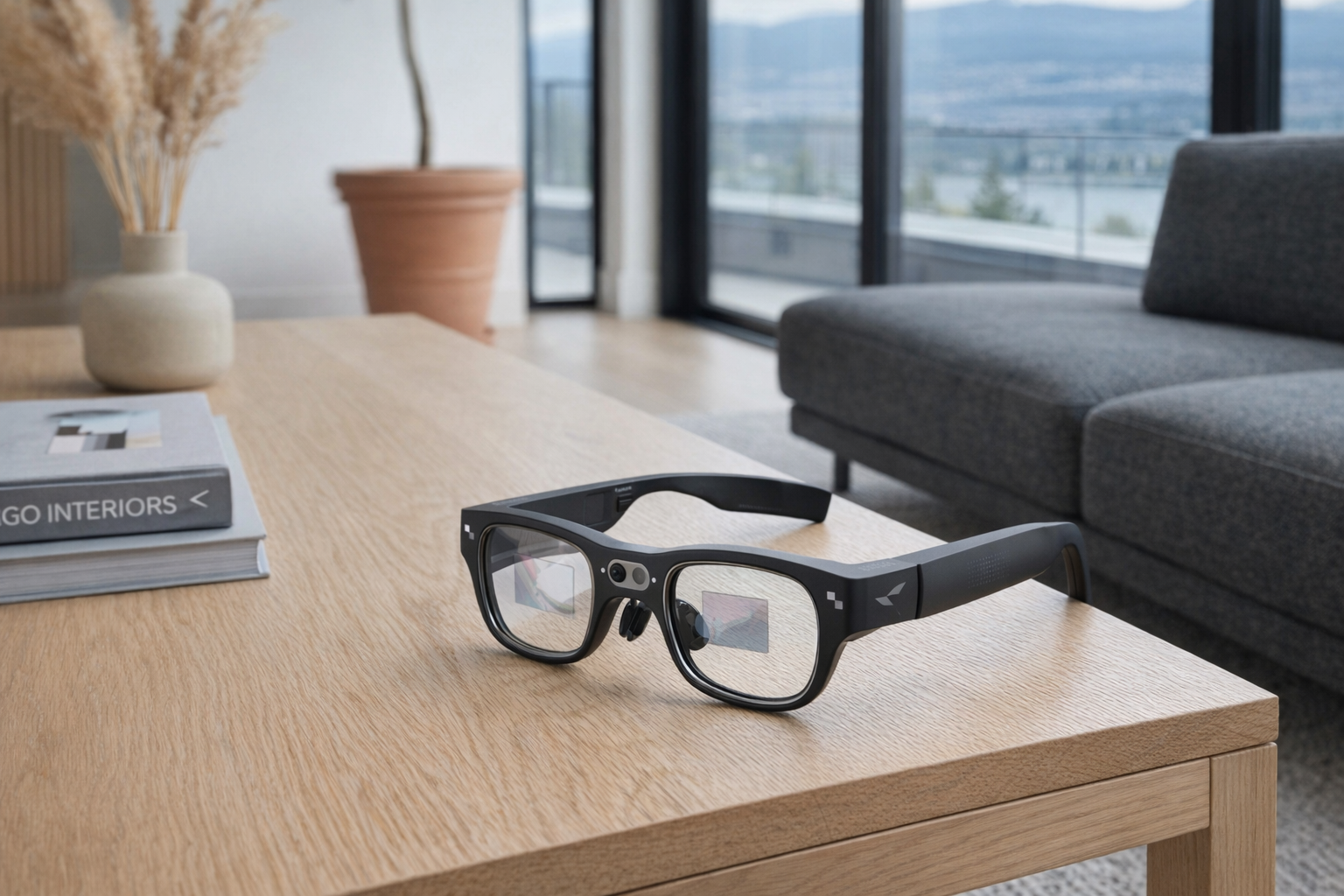
The RayNeo X3 Pro sits in one of the more confusing corners of consumer tech right now: smart glasses that are trying to be more than camera specs on your face. These are not simple Bluetooth audio glasses, and they are not just a private floating screen for watching movies. RayNeo positions ...
The RayNeo X3 Pro sits in one of the more confusing corners of consumer tech right now: smart glasses that are trying to be more than camera specs on your face. These are not simple Bluetooth audio glasses, and they are not just a private floating screen for watching movies. RayNeo positions them as standalone AI+AR glasses with onboard computing, displays in both lenses, a camera, Wi-Fi, and Google Gemini support. That puts them closer to a wearable Android device than to something like Ray-Ban Meta glasses.
This article is not a hands-on review. Nothing here is based on personally wearing the glasses. The goal is simpler: explain what the RayNeo X3 Pro appears to be, what the listed features suggest your first week with it might actually feel like, and who should be careful before spending ~$1799 CAD on a very early-category product. If you are trying to figure out whether these are useful glasses, an expensive tech demo, or something in between, this is for you.
📺 Watch: RayNeo X3 Pro in context
Quick snapshot
| Question | What the RayNeo X3 Pro actually is |
|---|---|
| Category | Smart Glasses |
| Made by | RayNeo |
| Typical price | ~$1799 CAD (listing at the time of writing — verify current pricing) |
| Rating signal | Check current reviews |
| Best for | Early adopters, frequent travellers, developers, and gadget buyers who specifically want on-face translation and visual AI assistance |
| Skip if | You mainly want stylish camera glasses, all-day comfort above all else, or a cheap first step into wearables |
Pro tip: Treat the RayNeo X3 Pro as a special-purpose wearable computer, not as your next everyday glasses. That framing makes the price and compromises much easier to judge honestly.
What the RayNeo X3 Pro actually is
In plain English, the RayNeo X3 Pro is a pair of smart glasses with tiny built-in displays that can show information in front of your eyes while also running AI features without needing to be tethered to a phone for everything. The key word here is standalone. A lot of glasses in this category still depend heavily on a connected handset to do the real work. RayNeo says the X3 Pro has its own compute platform, storage, operating system, Wi-Fi connectivity, and AI layer, which suggests a more self-contained device than the typical “smart glasses” marketing pitch.
The RayNeo X3 Pro are standalone AI+AR smart glasses powered by Snapdragon AR1 with Google Gemini AI integration. Featuring dual full-color MicroLED displays with 6,000 nits peak brightness and 640x480 resolution per eye, a 12MP camera, and Android-based RayNeo AIOS. At 76g, they run independently with Wi-Fi, offering real-time translation, navigation, and AI assistance.
That description tells you two important things. First, these glasses are trying to deliver heads-up information, not just audio or passive recording. Second, they are doing it in a body that still weighs 76g, which is light for a self-contained computer but still meaningfully heavier than ordinary eyewear. Compared with Ray-Ban Meta smart glasses, the RayNeo X3 Pro appears far more ambitious on display and AR functions. Ray-Ban Meta glasses are easier to understand: camera, mics, speakers, assistant. The X3 Pro is aiming at visual overlays, translation, and on-face navigation — which is more interesting, but also a harder product to get right.
Key features at a glance
- Dual full-color MicroLED displays with 6,000 nits peak brightness
- 640x480 resolution per eye
- Snapdragon AR1 platform
- 4GB RAM + 32GB storage
- Google Gemini AI integration
- 12MP camera for photos and video
- 76g standalone design with Wi-Fi
- Android-based RayNeo AIOS
- Real-time translation, navigation, and AI assistance
How the RayNeo X3 Pro actually works
The basic idea is that the RayNeo X3 Pro puts a small Android-based computing platform on your face, then uses transparent display optics to place information into your field of view. The listed dual MicroLED displays are the heart of the experience. Those displays can reach 6,000 nits peak brightness, which matters because wearable displays have to fight the real world. A floating interface that looks good indoors but washes out on a sunny sidewalk is not much use. That brightness claim suggests RayNeo is trying to address one of the oldest weak points in AR-style eyewear.
The second piece is the onboard brain: Snapdragon AR1, paired with 4GB of memory and 32GB of storage. That is modest by phone standards but sensible for a narrow-purpose wearable. It should be enough for a lightweight glasses OS, voice interaction, camera functions, translation tools, and short bursts of on-device processing, with heavier AI tasks likely leaning on cloud services when Wi-Fi is available. That is a more honest design than pretending tiny glasses can do everything locally forever.
The third layer is the software stack. RayNeo says the glasses run RayNeo AIOS with Google Gemini AI integration. In practical terms, that likely means the experience is not just “show notifications on a lens.” It is meant to support tasks like asking for contextual help, getting translations, following directions, and using camera input as part of an AI workflow. If that works well, the glasses become something closer to an assistant that can see what you see. If it works poorly, they become a fiddly interface strapped to your face. That gap is why expectations matter here.
There are really four systems working together:
- Display system: projects visual information to each eye at 640x480 resolution.
- Compute system: the Snapdragon AR1 handles the operating system, camera, connectivity, and interface logic.
- Camera and sensors: the 12MP camera supports photos, video, and likely some AI-assisted visual features.
- AI and connectivity: Gemini integration and Wi-Fi make translation, guidance, and assistant tasks possible beyond basic local functions.
A realistic "day in the life" with RayNeo X3 Pro
Because this is an explainer rather than a review, the useful question is not “how did it feel in testing,” but “what does the feature list imply a normal day might look like?”
- Morning: You put on the RayNeo X3 Pro before leaving the house and use it for quick heads-up information rather than pulling out your phone immediately. That could mean simple AI prompts, a glanceable interface, or route guidance before a commute. The standalone design and Wi-Fi support suggest the glasses are intended to do at least some of this without feeling like a dumb accessory.
- Midday: This is where the real-time translation angle becomes more concrete. In a travel, conference, or multilingual work setting, the glasses could plausibly display translated text or contextual assistance in front of you. That is one of the few use cases in smart glasses that genuinely benefits from being on your face instead of on your phone.
- Afternoon: You might use the 12MP camera to grab quick first-person photos or short video clips, or to feed visual context into AI queries. This is also the point in the day when the weight question becomes real. At 76g, the glasses are not absurdly heavy for what they contain, but they are still a wearable computer, not a normal pair of frames.
- Evening: Back at home or in a hotel, the RayNeo X3 Pro likely shifts from mobility tool to experiment platform: checking what the AIOS interface can do, adjusting settings, exploring assistant functions, or testing whether the visual display is genuinely useful in low-pressure situations. For a lot of buyers, the first week will be as much about learning when not to wear them as when to reach for them.
Who the RayNeo X3 Pro is actually for (and who it isn't)
Great fits
- Frequent travellers who would genuinely use on-face translation and navigation in airports, train stations, hotels, and unfamiliar city streets.
- Developers and XR tinkerers who are comfortable buying early hardware because the platform itself is the attraction.
- Executives, consultants, or field workers who like the idea of glanceable information without constantly checking a phone.
- Tech enthusiasts with a high gadget budget who already know they are paying for a category experiment, not a polished mainstream appliance.
- People specifically interested in AI-assisted visual computing, not just music, notifications, or casual photos.
Poor fits
- Anyone wanting fashionable everyday glasses first and gadgets second. At this stage, these products are still technology objects.
- Buyers who mainly want an easy camera-glasses experience. Something like Ray-Ban Meta glasses is a clearer, simpler purchase.
- People sensitive to face weight or nose pressure. Even a reasonable 76g can feel like a lot over longer sessions.
- Shoppers expecting laptop-level AR productivity. The listed 640x480 per eye resolution is useful for prompts and overlays, but it is not the same as replacing a monitor.
- Privacy-first households or workplaces that do not want a wearable camera and AI-enabled microphone setup in the room.
Practical trade-offs
Comfort and wearability
The most immediate trade-off is right there in the spec sheet: 76g. That is impressive considering the glasses include displays, a chipset, storage, Wi-Fi, and a 12MP camera, but physics still wins. The first week with a device like this is usually less about whether it can do cool things and more about whether you want it on your face long enough to use those things. Evaluate it like a lightweight headset, not like your regular prescription frames.
Privacy
The RayNeo X3 Pro includes a camera and AI features that are specifically meant to interpret the world around you. That is the product's appeal, but it is also the reason some people will rule it out instantly. In public, camera glasses can make bystanders uneasy even when used responsibly. In workplaces, client settings, classrooms, or private homes, the combination of a 12MP camera and cloud-linked AI raises obvious questions about recording, visual analysis, and where data goes. If you are already uncomfortable wearing camera glasses, the extra AI layer will not help.
Software maturity and long-term support
A device like this lives or dies by software. The hardware specs are interesting — Snapdragon AR1, 4GB + 32GB, MicroLED displays, Gemini integration — but the actual value depends on whether RayNeo AIOS feels stable, useful, and supported over time. Smart glasses are not like dumb sunglasses that age gracefully. They need updates, app support, and continued service integration. At ~$1799 CAD, you are not just buying frames and screens; you are buying into RayNeo's ability to maintain an ecosystem. That deserves a healthy amount of skepticism.
Where the RayNeo X3 Pro fits in a smart home
The RayNeo X3 Pro does not really belong at the centre of a smart home. It fits better as a mobile edge device that complements the systems you already use.
A realistic setup looks like this:
- Your phone remains the main hub for apps, account management, and anything that needs a familiar screen.
- Google services are the natural companion layer here because of the listed Gemini integration.
- Smart speakers and displays like a Nest Hub, Echo Show, or Apple HomePod still make more sense for household control.
- Navigation and translation apps are where the RayNeo X3 Pro may carve out a genuine niche, because glasses can present information without forcing you to keep grabbing your phone.
In other words, this is not the thing that should run your lights, thermostat, or doorbell cameras. It is the thing you wear when you leave the house, travel, move through a city, visit a trade show, or want AI help in a more heads-up format. That is a narrower role than the marketing might imply, but it is also a more believable one.
The buying decision, in plain terms
Three questions usually make the answer clear with the RayNeo X3 Pro:
- Do you specifically want visual AI on your face, or do you just want smart glasses in general? If it is the second one, a simpler camera-and-audio model may be the better fit.
- Will you actually use translation, navigation, or heads-up prompts often enough to justify roughly $1799 CAD? That is the core value case here.
- Are you comfortable paying early-adopter money for a software-dependent wearable? Because that is what this is, even if the hardware sounds polished on paper.
If those three answers are yes, the RayNeo X3 Pro looks like a serious category product worth deeper research. If any one of them is a firm no, skip it and wait for the category to get cheaper, lighter, and less experimental.
Got Questions About the RayNeo X3 Pro? Let's Clear Things Up.
Is this a hands-on review?
No. This is an informational explainer based on RayNeo's published product details and the broader smart-glasses category. It is meant to help you understand what the RayNeo X3 Pro appears to offer and what trade-offs come with that.
Does the RayNeo X3 Pro need a phone to work?
According to the listing, it is a standalone device with Wi-Fi and its own Android-based RayNeo AIOS. That suggests it can do more on its own than many smart glasses. Still, for setup, account management, and day-to-day convenience, a phone will likely remain part of the broader experience.
Is the display bright enough for outdoor use?
RayNeo lists 6,000 nits peak brightness for the dual MicroLED displays, which is a strong claim and clearly aimed at daylight visibility. On paper, that is exactly the kind of spec AR glasses need to be usable outside. The honest caveat is that brightness alone does not guarantee a perfect outdoor experience; optics and interface design matter too.
Can the RayNeo X3 Pro replace your phone or laptop?
Probably not in any full sense, and buyers should be wary of that fantasy. The glasses appear better suited to short, contextual tasks like translation, AI prompts, navigation, and quick capture through the 12MP camera. Think companion computer, not primary computer.
How does it compare with Ray-Ban Meta smart glasses?
The short version is that Ray-Ban Meta smart glasses appear more mainstream and easier to understand, while the RayNeo X3 Pro is aiming much higher on AR and display functions. Ray-Ban Meta focuses on photos, video, audio, and voice assistant use. RayNeo is trying to add actual in-view visual information, which is more ambitious and potentially more useful — but also more complex and more expensive.
Where can you verify the latest specs or buy it?
The best place to verify current details, availability, and any updated software claims is the official product page: RayNeo X3 Pro at RayNeo. For a product this software-dependent, that is smarter than relying on old listings or launch material.
What does it cost in Canada?
At the time of writing, the listed price is ~$1799 CAD. That places it firmly in premium early-adopter territory, so it makes sense to watch for pricing changes, bundles, or retailer availability before buying.
Where is the Celmin Directory listing for this product?
For a catalog-style view of the same product — structured specs, pros and cons, similar picks, and FAQ — see RayNeo X3 Pro on Celmin Directory.
If you're building a smarter home in Canada and want honest explainers on gadgets worth considering — plus the ones worth skipping — Celmin covers the full catalog without the marketing theater. More reviews, comparisons, and buyer guides at https://celmin.ca.
Discussion
Sign up or sign in to join the conversation.