
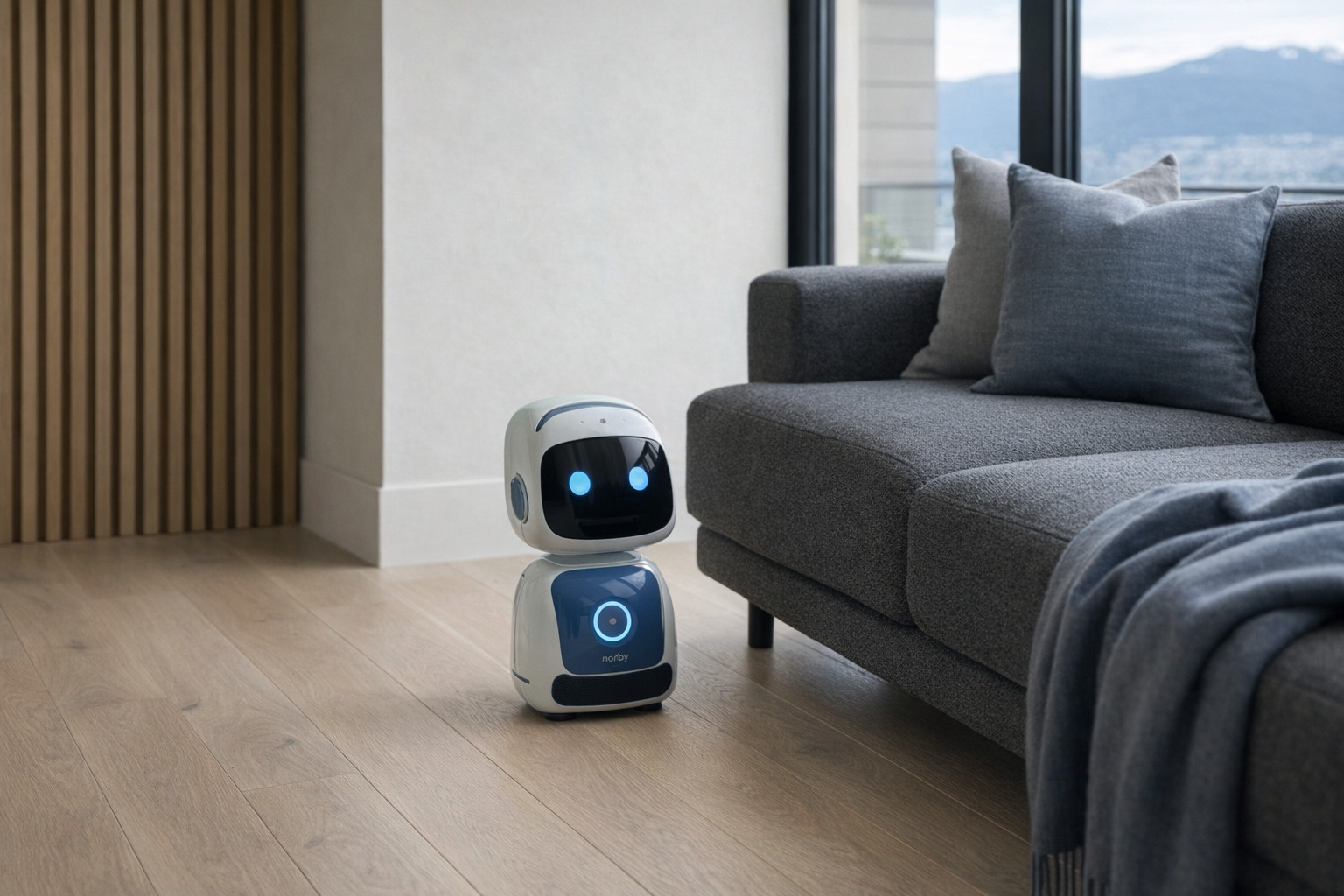
The Norby Robot sits in an interesting corner of the AI-companion world because it is not really aimed at the usual desk-toy buyer first. On paper, this is a physical AI voice robot built for storefronts, hotel counters, car dealerships, trade-show booths, and other public-facing spaces w...
The Norby Robot sits in an interesting corner of the AI-companion world because it is not really aimed at the usual desk-toy buyer first. On paper, this is a physical AI voice robot built for storefronts, hotel counters, car dealerships, trade-show booths, and other public-facing spaces where someone normally has to greet visitors, answer repetitive questions, and point people in the right direction. That makes it less like a cute home robot and more like a compact, always-available front-desk personality with a sales script.
This article is not a hands-on review. Nothing here is based on personally using the product. The goal is simpler: explain what the Norby Robot appears to be from its listing details, what its feature set suggests in real use, and who it makes sense for before anyone spends roughly $955 CAD on a niche AI gadget. If the marketing language feels a little too polished, this is the calmer version.
📺 Watch: Norby Robot in context
Quick snapshot
| Question | What the Norby Robot actually is |
|---|---|
| Category | AI Companions |
| Made by | Norby |
| Typical price | ~$955 CAD (listing at the time of writing — verify current pricing) |
| Rating signal | Check current reviews |
| Best for | Small businesses, showrooms, event booths, and reception-style spaces that want automated greetings and basic customer Q&A |
| Skip if | You want a true home assistant, deep smart-home control, or a privacy-light gadget with no voice capture |
Pro tip: Treat the Norby Robot like a front-of-house assistant, not a magical employee replacement. It makes more sense handling the first 30 seconds of interaction than the entire customer relationship.
What the Norby Robot actually is
In plain English, the Norby Robot is an always-on talking robot meant to sit in a customer-facing environment and handle repetitive first-contact tasks: greet people, answer common questions, suggest products or services, and collect lead details when a human salesperson is not immediately available. The key idea is not companionship in the classic desk-pet sense. It is more like a branded conversational kiosk with a body and a voice.
Norby is a physical AI voice robot designed for retail, automotive, hospitality, and real estate environments. It greets customers, answers product questions, provides tailored recommendations, captures leads, and supports multilingual conversations — operating 24/7 as an always-on sales and concierge assistant.
That puts it closer to a commercial receptionist tool than to something like Amazon Astro, which is a home robot built around household monitoring, video calling, and domestic movement. Norby's pitch is narrower and, frankly, more believable: stay put, talk to people, speak multiple languages, and help route interest into leads. That is a more honest design than many robots that claim to be assistants for everything.
Key features at a glance
- AI-powered voice conversations for customer-facing interactions
- Multilingual support in 30+ languages
- Customer greeting and lead capture
- Product Q&A and recommendations
- 24/7 autonomous operation
- Retail, hospitality, and event deployment
How the Norby Robot actually works
The basic mechanism seems straightforward. Norby is designed to function as a physical conversation point in a public-facing setting. Someone approaches, the robot greets them, and the interaction moves into a question-and-answer flow around products, services, availability, or next steps. In a retail shop, that might mean answering common questions about items. In a real-estate office, it might mean collecting contact info from a walk-in visitor. In hospitality, it might be guiding guests toward check-in or basic local information.
Its most important feature is likely not that it talks, but what kind of talking it is built for. There is a big difference between a general-purpose voice assistant and a robot trained around business-facing scripts, recommendations, and lead handling. Norby appears to live in that second category. That means the value is probably highest when the questions are somewhat predictable and the business can shape the responses.
A realistic way to think about the workflow is this:
- Greeting: The robot detects or responds to an approaching person and starts the interaction.
- Conversation: The visitor asks a question about products, services, or options.
- Recommendation: The robot offers a tailored answer or directs the person toward relevant choices.
- Lead capture: If the customer is interested, Norby collects contact details or inquiry information.
- Handoff: A human staff member follows up, or the visitor is routed to the right part of the business.
The 30+ language support matters more than it first appears. In multilingual environments like hotels, tourist-facing shops, international trade shows, or urban retail settings, being able to switch across languages is not just a flashy demo. It can reduce friction for visitors who would otherwise hesitate to ask anything at all. But it is worth keeping expectations grounded: multilingual support is useful for common interactions, not a guarantee of perfectly nuanced conversation in every language and dialect.
A realistic "day in the life" with Norby Robot
Because this is not a tested review, think of the following as what the listed features imply rather than a verified diary.
- Morning: A retail shop or showroom opens, and Norby starts greeting the first walk-in visitors. Someone asks where to find a certain type of product, and the robot handles that basic orientation question without tying up a staff member right away.
- Midday: A customer asks more detailed questions about product differences or which option might suit their needs. This is where the product Q&A and recommendation layer matters; Norby can serve as the first pass before a salesperson steps in.
- Afternoon: In a busy stretch, staff are occupied with other customers. A new visitor approaches and speaks in another language. Norby's 30+ language support becomes the main feature, helping that person get basic information rather than standing around waiting.
- Evening: After foot traffic slows, Norby continues functioning as an always-on contact point. A late visitor or event attendee asks for information, leaves their details, and the business has a lead to follow up on the next day thanks to the lead-capture function and 24/7 availability.
Who the Norby Robot is actually for (and who it isn't)
Great fits
- A small retail store owner who keeps losing potential customers when staff are busy helping someone else.
- A car dealership reception area that needs a consistent first greeting and basic model or service-direction answers.
- A hotel lobby or hospitality desk that wants multilingual front-of-house support for common guest questions.
- An event or trade-show exhibitor that needs a conversation starter and lead-capture tool that can work through long show hours.
- A real-estate sales centre where walk-in prospects often ask the same early-stage questions before speaking with an agent.
Poor fits
- A household shopper looking for a fun domestic robot companion. Norby's feature list is much more business-facing than home-friendly.
- A business expecting full sales automation with no staff involvement. Lead capture is not the same thing as closing complex deals.
- A privacy-sensitive office that does not want customer conversations passing through an AI voice system.
- A tiny shop with almost no foot traffic, where a $955 robot may be solving a problem that barely exists.
- A buyer wanting deep smart-home integration with lights, thermostats, cameras, and routines. That is not this product's lane.
Practical trade-offs
Privacy
This is the first serious question to ask, because Norby's job is literally to talk to visitors and capture leads. That means you should assume some level of voice interaction data and customer information handling is part of the system. If the business environment includes sensitive conversations, medical details, financial information, or anything else that should not pass through a general AI concierge, this needs careful scrutiny.
Lead capture adds another layer. Names, phone numbers, email addresses, and inquiry details are all potentially involved. Before deploying something like this, a business should verify where that data goes, how long it is stored, how it is deleted, and whether the setup meets the company's own privacy obligations. The robot may be charming; the compliance work is still boring and necessary.
Setup and content quality
A robot like this is only as useful as the information it is given and the boundaries around its answers. If the product knowledge is vague, outdated, or too broad, the experience can go from impressive to irritating very quickly. A concise, well-maintained knowledge base will matter more than the hardware shell.
That is why Norby is best evaluated like a customer-service channel, not like a novelty gadget. Someone on the business side still needs to think through the common questions, the desired responses, and what should trigger a human handoff. "AI-powered" does not remove the need for setup; it just changes the kind of setup you do.
Long-term value
At about $955 CAD, Norby is not wildly expensive by commercial hardware standards, but it is still a meaningful purchase for a small business. The question is not whether the robot can talk. The question is whether it can save enough staff time, increase enough captured leads, or create enough useful customer interactions to justify the cost.
That answer will vary a lot by setting. In a busy trade-show booth or multilingual reception area, the value proposition is fairly easy to see. In a quiet boutique with highly personalized service, it may feel more like a conversation piece than an operational tool. Evaluate it like signage-plus-staff support, not like a magical growth engine.
Where the Norby Robot fits in a customer-facing business setup
Norby makes the most sense as part of a broader front-of-house system rather than as a standalone star. In a real business, it would sit alongside more conventional tools:
- A CRM platform for storing and following up on the leads it captures
- A tablet or POS system for inventory, pricing, and transactions
- A booking system for hospitality or service-based businesses
- A human receptionist or sales associate for anything complex, sensitive, or high-value
If you are already using ecosystems like Shopify POS, Square, or a dealership/customer-management platform, Norby should be thought of as the conversation layer at the entrance, not the system of record behind the business. That is the healthiest framing. The robot can welcome, answer, and route; the rest of the stack should still do the real operational work.
For home users, the fit is much weaker. This is not the robot you buy instead of an Echo speaker, a Google Nest Hub, or a standard smart display. It is built around public interaction and business inquiry handling. In a house, much of that value simply disappears.
The buying decision, in plain terms
Before buying, three questions usually make the answer clearer.
- Do you actually have repeated walk-in questions to automate?
If customers regularly ask the same early-stage questions, Norby has a real job to do. If every interaction is unique and high-touch, it may mostly be decoration. - Are you comfortable with AI handling first-contact conversations and lead details?
If the privacy and data-handling side feels murky, pause there. This product only makes sense if that operational piece is acceptable. - Will it support staff, or are you secretly hoping it replaces staff?
Norby looks best as an assistant that covers greetings, basic Q&A, and overflow moments. If you are expecting a full substitute for trained people, expectations are heading in the wrong direction.
If the answer to all three is yes, Norby looks like a sensible niche tool. If not, a simpler tablet kiosk or a well-run reception desk may be the better spend.
Got Questions About the Norby Robot? Let's Clear Things Up.
Is this a hands-on review?
No. This is an informational explainer based on the product's published details and the broader category of AI voice robots. It is meant to help you understand what Norby appears to be good at, not to replace a hands-on evaluation.
Is the Norby Robot meant for home use?
It does not really look that way. The core pitch is around retail, automotive, hospitality, real estate, and events, which are all customer-facing commercial settings. A home user could technically be interested, but the features are clearly aimed at businesses.
What does multilingual support actually mean here?
According to the listing, Norby supports 30+ languages. In practical terms, that likely means it can handle greetings, questions, and basic recommendation flows across a wide range of languages, which is useful in public-facing environments. It does not automatically mean perfect fluency for every specialized or nuanced conversation.
Does Norby Robot work as a lead-capture tool?
That is one of its advertised functions. The point is not just to answer questions, but to turn some of those conversations into contact details or business inquiries a human team can follow up on later. For many businesses, that function may matter more than the robot form factor itself.
Where can I verify the current details or buy it?
The safest place to verify the latest product information, availability, and any updated business use cases is the official retailer link: Norby Robot. Since AI products can change quickly, it is worth checking the live page for current pricing, supported features, and any terms around setup or service.
Is Norby Robot a replacement for a receptionist or salesperson?
Not in any complete sense. It appears better suited to handling first greetings, repetitive questions, and after-hours or overflow interactions. Think of it as a filter and conversation starter, not a substitute for skilled human staff.
What does it cost in Canada?
At the time of writing, the listed price is ~$955 CAD. Because this is a niche AI hardware category, pricing can change, so it is worth confirming the current amount on the official site before making a business purchase decision.
Where is the Celmin Directory listing for this product?
For a catalog-style view of the same product — structured specs, pros and cons, similar picks, and FAQ — see Norby Robot on Celmin Directory.
If you're building a smarter home in Canada and want honest explainers on gadgets worth considering — plus the ones worth skipping — Celmin covers the full catalog without the marketing theater. More reviews, comparisons, and buyer guides at https://celmin.ca.
Discussion
Sign up or sign in to join the conversation.