
The Govee TV Backlight 3 Lite sits in a very specific corner of home tech: the camera-based TV bias light. It is not a new television, not a streaming box, and not a surround-sound upgrade. It is an LED light strip system designed to mount behind your TV and change colour based on what is hap...
The Govee TV Backlight 3 Lite sits in a very specific corner of home tech: the camera-based TV bias light. It is not a new television, not a streaming box, and not a surround-sound upgrade. It is an LED light strip system designed to mount behind your TV and change colour based on what is happening on screen. The pitch is simple enough: make movies, games, and sports feel bigger and more immersive without spending anywhere near OLED-TV money.
This article is not a hands-on review. Nothing here is based on personally using the product. Instead, the goal is to explain what the Govee TV Backlight 3 Lite actually is, how this type of system generally works, how it compares with the better-known Philips Hue Play HDMI Sync Box approach, and who it genuinely makes sense for. If you are staring at the product page wondering whether this is a clever upgrade or just decorative clutter, this is the calm version.
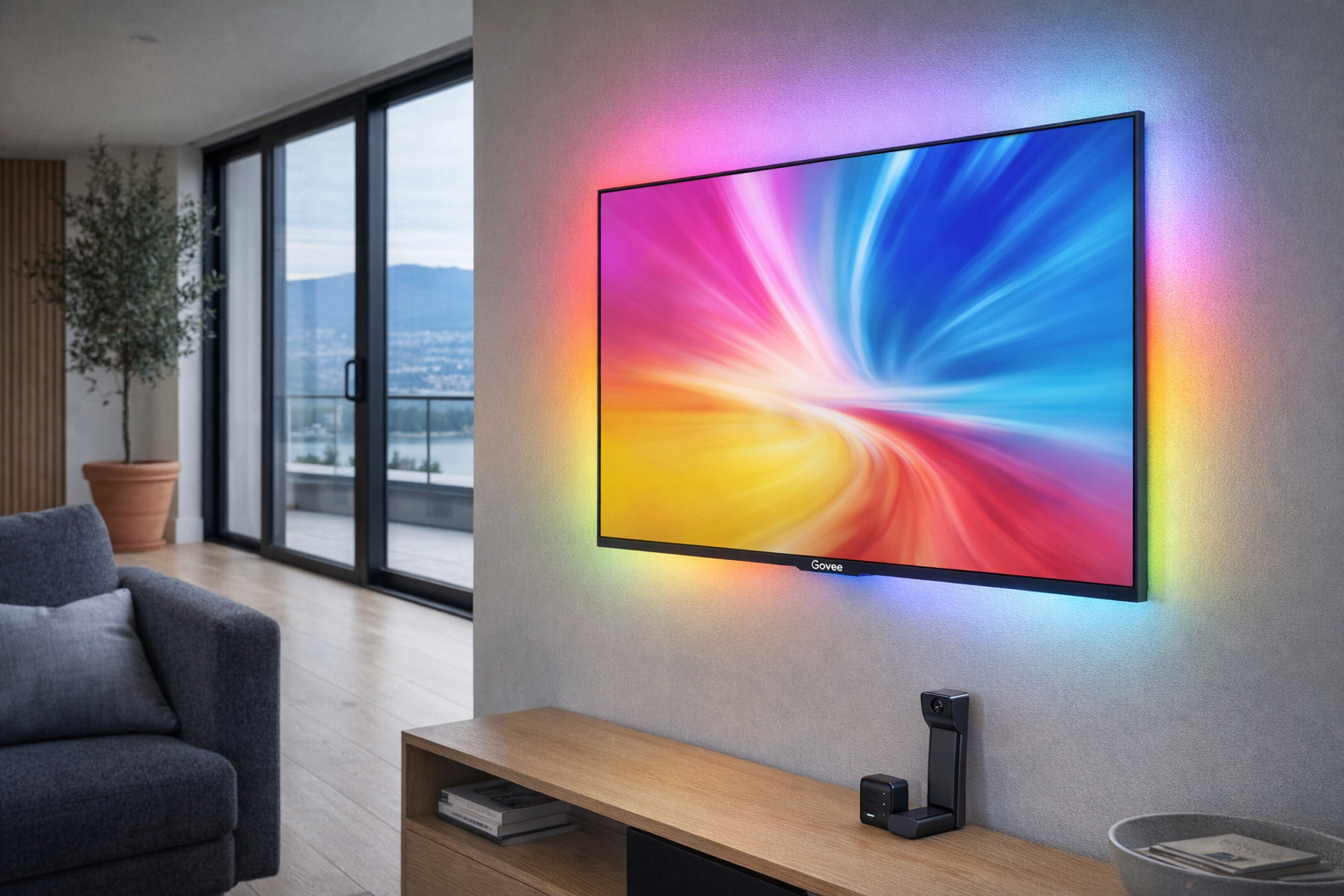
Quick snapshot
| Question | What the Govee TV Backlight 3 Lite actually is |
|---|---|
| Category | Entertainment |
| Made by | Govee |
| Typical price | Pricing varies — check current Canadian listings |
| Rating signal | 4.5/5 on the source listing |
| Best for | TV owners who want screen-reactive ambient lighting without paying for a full HDMI sync ecosystem |
| Skip if | You want perfectly exact colour matching, hate visible add-on hardware, or already use a premium Hue-based setup |
Pro tip: If you buy a TV backlight like this, treat it as an ambience upgrade, not a picture-quality upgrade. It can make a room feel better, but it will not fix poor contrast, weak speakers, or bad streaming compression.
What the Govee TV Backlight 3 Lite actually is
In plain English, the Govee TV Backlight 3 Lite is a kit that adds coloured LED lighting to the back of your television and uses a camera to read the screen so the lights can match the dominant colours of what you are watching. That is the core appeal. You put the strip behind the TV, attach the camera near the top or bottom edge depending on the setup, and the system tries to mirror the image on screen in real time. Think of it as mood lighting that follows your content rather than a conventional lamp you turn on and ignore.
That empty description block is a little telling on its own: with products like this, the marketing often focuses more on the effect than on a crisp explanation of the mechanism. The important thing to understand is that the 3 Lite appears to be the more affordable, simpler route into Govee's TV-lighting ecosystem. Instead of relying on an HDMI sync box and routing your sources through another piece of hardware, it uses a camera-based system pointed at the display. That is cheaper and easier for many people, though typically a little less exact.
The obvious real-world comparison here is the Philips Hue Play HDMI Sync Box. Hue's approach tends to be cleaner in terms of signal accuracy because it reads the HDMI source directly, but it is also much more expensive and more complicated to build out, especially once you add the box itself plus Hue lights. The Govee TV Backlight 3 Lite is the more practical, budget-minded version of the idea. For many people, that is a more honest design than chasing a premium setup they will never actually buy.
Key features at a glance
- Screen-reactive TV backlighting designed to match colours from on-screen content
- Camera-based syncing rather than a full HDMI sync box setup
- Smart ambient lighting effect for movies, games, and general TV watching
- App-based control through Govee's ecosystem, with expected customization options
- Lower-cost entry point into reactive TV lighting compared with premium competitors
- Designed as an add-on to your existing TV, not a replacement for your TV's built-in features
How the Govee TV Backlight 3 Lite actually works
The basic mechanism is straightforward. An LED strip goes on the back of the TV, and a small camera watches the screen from the front. The control box then interprets what the camera sees and tells different sections of the strip to change colour. If the left side of the screen looks blue and the right side looks orange, the backlight aims to echo that split across the wall behind the TV.
That camera-based approach matters because it avoids one of the biggest hassles in this category: HDMI compatibility. With an HDMI sync box, every source device often needs to route through the box, which can get messy fast if you use multiple consoles, streaming sticks, cable boxes, or built-in smart TV apps. A camera doesn't care whether the picture is coming from Netflix on the TV itself, a PlayStation, a sports broadcast box, or a Chromecast. It just reads the screen. That is why these systems appeal to people who want the effect without rebuilding their whole media setup.
There are a few practical layers to how a product like the Govee TV Backlight 3 Lite generally comes together:
- Physical installation. The LED strip adheres to the rear edge of the television. The exact fit depends on TV size compatibility, so that is one of the first things to verify on the listing before buying.
- Camera placement. The small camera mounts at the edge of the display and looks toward the screen. This is the piece some people tolerate easily and others hate on sight.
- Calibration. Through the app, you typically line up the screen boundaries so the system knows what part of the camera view is actually the TV image.
- Lighting behaviour. After setup, the system can usually run in reactive mode for movies and games, or in static/scene modes when you just want decorative room lighting.
The trade-off is accuracy. A camera-based system can be fooled by glare, very bright rooms, reflections, subtitles, or off-angle placement. It can still look impressive, especially from a couch a few metres away, but it is not the same as direct signal-level syncing. Evaluate it like a fun room effect, not like a professional reference display accessory.
A realistic "day in the life" with Govee TV Backlight 3 Lite
Because this is an informational piece rather than a test report, here is what a typical day might look like based on the product category and the listing context.
- Morning. The TV is on for news or a quick YouTube clip, and the backlight acts more like gentle ambient light than a dramatic effect. Bright graphics and colourful weather maps are where these systems tend to look best.
- Midday. Someone is gaming, and the screen-reactive lighting becomes more obvious. Fast changes, colourful HUD elements, and vivid environments can make the wall behind the TV feel more alive, even if the colour matching is not perfect frame by frame.
- Afternoon. The TV is off, but the app-based lighting system may still be useful as decorative accent light in the room. That matters, because a product like this makes more sense if it does something when you're not in full movie mode.
- Evening. This is the ideal use case: a darker room, a film or streaming series, and a wall behind the TV that extends the mood of the picture. In that setting, the effect is usually most convincing, and the camera-based syncing's limitations are less distracting than they might be in bright daylight.
Who the Govee TV Backlight 3 Lite is actually for (and who it isn't)
Great fits
- Apartment movie watchers who want the living room to feel more theatrical without drilling speakers into walls.
- Console gamers who care about room vibe and colour effects more than perfect reference-grade accuracy.
- Budget-conscious smart-home tinkerers who want reactive TV lighting but do not want to pay Philips Hue Sync Box money.
- Dorm or bedroom TV owners trying to make a modest setup feel more intentional and less like a bare screen on a stand.
- People using built-in TV apps who want sync lighting without worrying about whether an HDMI box supports every source.
Poor fits
- Minimalists who will immediately notice and resent a small camera mounted on the TV bezel.
- Home-theatre purists chasing exact image fidelity and clean hardware lines.
- Anyone with a very tight wall mount setup where adding a strip and camera could be awkward.
- People expecting this to improve black levels or HDR performance rather than just add ambient light around the screen.
- Users already deep into Philips Hue entertainment lighting who may find this redundant or less polished than what they already own.
Practical trade-offs
Install and calibration
This is not difficult in the same way wiring in-wall speakers is difficult, but it is not nothing either. You are sticking an LED strip around the back of a large panel, placing a visible camera, routing cables, and spending time in an app doing calibration. If you enjoy the last 10% of setup polish, this may be fine. If you get irritated by adhesive strips, alignment screens, and cable management, this product will ask more patience than a normal lamp.
TV size compatibility is also crucial here. A backlight kit is only useful if it fits your television properly, so check the current listing carefully before buying. With products like this, the difference between "looks integrated" and "looks awkward" often comes down to using the right kit for the right screen size.
Visual clutter
The LED strip itself is hidden once installed, which is the good news. The less good news is the camera. Camera-based systems are affordable for a reason: they put a small piece of hardware on or near the front edge of the television. Some buyers stop noticing it almost immediately. Others will see it every single time they sit down. That sounds minor until you remember this object lives in your main viewing area.
This is also why the Hue comparison matters. A sync-box setup moves the complexity into a separate box and keeps the front of the TV cleaner. The Govee route saves money, but it asks for more visual compromise.
Long-term usefulness
Reactive TV lighting can be genuinely fun, but it is also the kind of feature that some households use intensely for 2 months and then leave on a basic setting forever. That does not make it a bad buy; it just means you should be honest about your own habits. At $73.76 CAD on the supplied listing, this is not wildly expensive by smart-lighting standards, but it is still easier to justify if you know you actually enjoy ambient lighting.
The rating signal of 4.5/5 suggests many buyers are happy with what it does relative to the price. The key phrase there is relative to the price. People tend to forgive a lot when a gadget delivers most of the effect for a fraction of the premium alternative.
Where the Govee TV Backlight 3 Lite fits in a living-room setup
This product makes the most sense as one layer in a broader entertainment setup, not as the centrepiece. A realistic stack might look like this:
- TV: your existing smart TV from Samsung, LG, Sony, TCL, Hisense, or another mainstream brand
- Streaming source: built-in apps, Apple TV 4K, Fire TV Stick, Chromecast, or a game console
- Sound: a practical soundbar from Sonos, Bose, Samsung, or JBL
- Lighting: the Govee TV Backlight 3 Lite for reactive wall glow and atmosphere
That is the right mental model. The Govee TV Backlight 3 Lite does not replace a better television, a better sound system, or blackout curtains. It sits alongside them and improves the feel of the room. In a basement rec room, condo living room, or bedroom gaming setup, that can be exactly the right role.
If you already use other Govee lights, the fit may be even stronger. A broader Govee ecosystem can make the TV area feel more coordinated, with the backlight acting as the anchor and lamps or light bars extending the same colour language around the room. That is usually the smartest way to get value from reactive lighting: make it part of a full room mood, not a lone gimmick behind one screen.
The buying decision, in plain terms
Three questions usually decide whether the Govee TV Backlight 3 Lite makes sense.
- Do you actually want reactive ambient lighting, or do you just like the demo videos? If the appeal is mostly "that looked cool online," there is a fair chance it becomes background furniture fast.
- Are you okay with a camera mounted on the TV? This is the make-or-break issue. If that hardware will annoy you every day, the lower price does not fix the problem.
- Would you rather spend the same money on something more foundational? Around $73.76 CAD, this sits in the range where some buyers would get more lasting value from a better streaming device, blackout curtains, or putting the money toward a soundbar.
If your answers are yes, yes, and no, the Govee TV Backlight 3 Lite looks like a sensible low-cost way to make a TV setup feel more immersive.
Got Questions About the Govee TV Backlight 3 Lite? Let's Clear Things Up.
Is this a hands-on review?
No. This is an informational explainer based on the product listing, the product category, and how camera-based TV backlighting systems generally work. It is meant to help you decide whether this type of product fits your setup before you go deeper.
Does the Govee TV Backlight 3 Lite use a camera or HDMI sync?
The product is positioned as a camera-based TV backlight system rather than a full HDMI sync-box solution. That usually means easier compatibility with built-in TV apps and multiple video sources, but somewhat less precision than a direct HDMI-based system.
Will it work with Netflix, game consoles, and built-in smart TV apps?
A camera-based design generally works with whatever appears on the TV screen, which is one of its biggest advantages. That includes streaming apps running directly on the TV, consoles, and other connected devices, because the system reads the display itself rather than relying on a single HDMI path. Check the current listing for any source-specific limitations.
Is the camera visible once installed?
Usually, yes. That is one of the main compromises with this category. The LED strip stays hidden behind the television, but the camera sits at the edge of the screen area and is difficult to make fully invisible.
Does it improve picture quality?
Not directly. It does not increase resolution, HDR quality, contrast, or refresh rate. What it can do is make the room around the TV feel more immersive and, in some setups, make viewing in a dark room feel a bit more comfortable because the screen is not the only light source.
Where can I verify the current listing or buy it?
The most direct place to check the latest listing details is the product page here: Govee TV Backlight 3 Lite on Amazon. Since smart-lighting listings can change, it is worth verifying TV size compatibility, included accessories, and current pricing before buying.
What does it cost in Canada?
The supplied product data lists $73.76 CAD, but pricing can move around with sales, coupons, and marketplace changes. For the quick snapshot in this article, the safest description is Pricing varies — check current Canadian listings.
Where is the Celmin Directory listing for this product?
For a catalog-style view of the same product — structured specs, pros and cons, similar picks, and FAQ — see Govee TV Backlight 3 Lite on Celmin Directory.
If you're building a smarter home in Canada and want honest explainers on gadgets worth considering — plus the ones worth skipping — Celmin covers the full catalog without the marketing theater. More reviews, comparisons, and buyer guides at https://celmin.ca.
Discussion
Sign up or sign in to join the conversation.